Forward Deployed AI Agents: The Engineers That Never Sleep
"The best way to predict the future is to invent it." — Alan Kay
Reading time: 15 minutes Series: The Matih Platform Blog Series (5 of 8) Audience: Business Leaders, Product Managers, Data Engineers, Anyone who's ever waited in a ticket queue

The Palantir Model, Reimagined
Palantir built a $50 billion company on a deceptively simple idea: deploy brilliant engineers directly into customer environments. These Forward Deployed Engineers (FDEs) didn't just build software — they embedded with military units, financial institutions, and healthcare systems, understanding the domain deeply enough to bridge the gap between raw data and actionable decisions.
It worked spectacularly. But it had a fundamental scaling problem: brilliant engineers are expensive, scarce, and can only be in one place at a time. A human FDE serving one customer can't simultaneously serve another.
Now imagine the same model, but instead of deploying human engineers, you deploy AI agents — specialized, tireless, domain-aware digital workers that embed in your data environment, understand your business context, and work 24/7 without burning out.
That's what Matih is building. Not a chatbot with a database connection. A team of specialized AI agents that collaborate, reason, learn from feedback, and know when to ask a human for help.
Meet the Team
When you ask Matih a question, you're not talking to one AI. You're talking to a coordinated team of specialist agents, each with deep expertise in their domain:
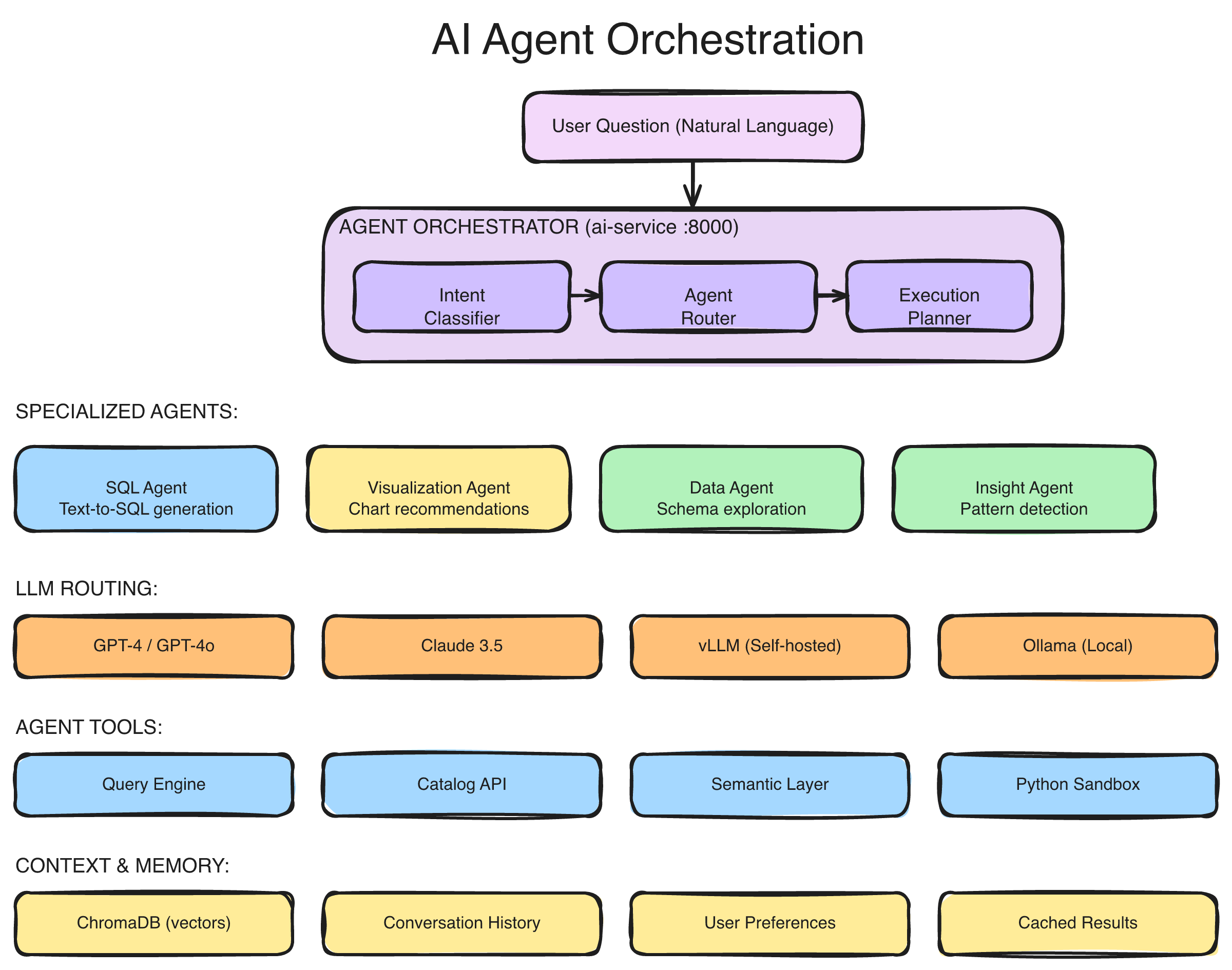
The multi-agent orchestration architecture: user messages flow through a WebSocket streaming layer to the Router Agent, which classifies intent and delegates to specialist agents (SQL, Analysis, Visualization, Documentation, Ops). A Persona-Based Supervisor adapts behavior based on user role. Results stream back progressively in real-time.
The Router Agent — Air Traffic Control
Every conversation starts here. The Router reads your question, classifies the intent, and decides which specialist (or specialists) should handle it. "Show me revenue by region" routes to the SQL and Visualization agents. "Why did the pipeline fail last night?" routes to the Ops agent. "How do I create a new data source?" routes to the Documentation agent.
The Router doesn't guess — it uses a combination of keyword detection, semantic understanding, and conversation history to make precise routing decisions. And it adapts: if you started with a data question but pivoted to asking about infrastructure, the Router re-routes mid-conversation without losing context.
The SQL Agent — From Words to Queries
The SQL Agent is where natural language becomes precise, validated SQL. But unlike simple text-to-SQL tools, it doesn't work alone. It consults:
- The Data Catalog — to know what tables and columns exist
- The Semantic Layer — to know what business terms like "revenue" and "churn rate" actually mean
- The Ontology — to understand entity relationships and validate concepts
- A Vector Store — to find similar past queries that worked
The result isn't a best-guess query. It's a semantically grounded, ontology-validated query that uses your organization's own definitions. When it generates SUM(orders.amount) for "revenue," it's because the semantic layer defines revenue exactly that way — not because it made an educated guess.
The Analysis Agent — Finding What Matters
Raw query results are numbers. The Analysis Agent turns them into insights. It spots trends, identifies outliers, flags statistically significant changes, and highlights what's interesting about the data.
"Revenue is up 12% quarter-over-quarter, driven primarily by the Enterprise tier in the Northeast region. However, the Southeast region shows a 6% decline — the first negative quarter in two years. This warrants investigation."
That's not a pre-built template. It's the Analysis Agent examining the data, applying statistical reasoning, and surfacing what a human analyst would find noteworthy.
The Visualization Agent — The Right Chart, Every Time
Data visualization is deceptively complex. A bar chart? A line chart? A heatmap? The answer depends on the data shape, the question context, and what comparison the user is trying to make.
The Visualization Agent selects the optimal chart type based on the data and the question, generates a complete visualization specification, and renders it. Time series data gets line charts. Categorical comparisons get bar charts. Distributions get histograms. Correlations get scatter plots. And no, it never recommends a 3D pie chart.
The Ops Agent — Your Infrastructure Expert
The Ops Agent monitors platform health, diagnoses issues, and recommends fixes. When a pipeline fails, it doesn't just tell you it failed — it tells you why, what downstream systems are affected (via the Context Graph), and what to do about it.
The Documentation Agent — Institutional Knowledge on Demand
"How do I configure a new data source?" "What's the difference between a scheduled and a triggered pipeline?" The Documentation Agent searches runbooks, FAQs, and platform documentation to answer operational questions — so your team stops pinging each other on Slack for answers that already exist.
The Supervisor: Adapting to Who's Asking
Here's something most AI analytics tools miss entirely: the same question means different things depending on who's asking.
When a VP of Sales asks "How are we doing?", they want a revenue dashboard with quota attainment. When a data engineer asks the same question, they want pipeline health metrics and job success rates. When an ML engineer asks, they want model performance and drift scores.
Matih solves this with persona-based routing. A Supervisor Agent detects the user's role — either from their profile or by analyzing their query patterns — and adapts the entire agent team's behavior:
| Persona | Focus | Response Style |
|---|---|---|
| Executive | Strategic KPIs, trends, summaries | High-level, visual, actionable |
| BI Analyst | Dashboards, reports, dimensions | Detailed, chart-heavy, exportable |
| Data Engineer | Pipelines, schemas, data quality | Technical, diagnostic, operational |
| ML Engineer | Models, features, training, drift | Statistical, performance-oriented |
| Platform Admin | Users, resources, configuration | System-level, operational |
The same underlying data, sliced differently, presented differently, explained differently — all based on who needs it.
Human-in-the-Loop: AI That Knows Its Limits
Here's the honest truth about AI agents: they shouldn't do everything autonomously. Some operations are too sensitive, too expensive, or too uncertain for a machine to execute without a human checkpoint.
Matih builds this principle into the architecture with configurable approval policies:
Write operations — Agents can read data freely, but modifying schemas, deleting records, or altering pipeline configurations requires human approval. The agent prepares the change, explains what it wants to do and why, and waits for a thumbs-up before executing.
Low-confidence decisions — When the agent's confidence drops below a configurable threshold, it escalates rather than guessing. "I'm 60% confident this query is correct, but the join path is ambiguous. Here are two options — which one matches your intent?"
High-cost operations — Operations that would consume significant compute resources (large-scale training jobs, full historical backfills) require approval before execution. The agent estimates the cost and presents it for human review.
The approval flow is real-time — notifications go out via the platform, Slack, or email, and the agent pauses its workflow until a decision arrives. If the human approves, the agent proceeds. If they reject, the agent acknowledges and suggests alternatives. If nobody responds within a timeout, a configurable policy determines whether to proceed or abort.
This isn't a limitation. It's a feature. The best AI systems know when to ask for help.
"Trust, but verify." — Ronald Reagan
Agent Studio: Build Your Own Agents
The built-in agents cover the most common use cases. But every organization has unique workflows, domain-specific terminology, and specialized needs that generic agents can't anticipate.
Agent Studio lets you create, configure, and deploy custom agents without writing code:
Define the persona — Give your agent a name, description, and behavioral instructions. "You are a compliance analyst agent. You specialize in GDPR data subject access requests. When a user asks about personal data, you first check the data catalog for PII-classified columns, then generate a report of all data held for that subject."
Configure capabilities — Select which tools the agent can use (SQL queries, pipeline execution, data profiling, external APIs), what data it can access, and what guardrails apply.
Set guardrails — Define safety constraints, operational limits, and financial caps. "Never execute queries that scan more than 100GB." "Always require approval before accessing tables classified as RESTRICTED." "Cap token usage at 10,000 per interaction."
Test before deploying — Agent Studio includes a preview mode that shows you the agent's reasoning step-by-step: what it would decide, which tools it would call, what SQL it would generate, how much it would cost — all without executing anything.
Version and iterate — Every agent configuration is versioned. Roll back to a previous version if a change doesn't work. Compare versions to see what changed. Audit who modified what and when.
Agents built in Agent Studio use the same orchestration infrastructure as the built-in agents — they inherit the same streaming, the same security model, the same observability, and the same human-in-the-loop capabilities.
The MCP Gateway: A Universal Tool Belt
AI agents are only as powerful as the tools they can use. Matih agents connect to the data ecosystem through the MCP Gateway — an implementation of Anthropic's Model Context Protocol, the emerging standard for connecting AI agents to enterprise tools.
The MCP Gateway provides:
Tool registration and discovery — Tools are registered with typed schemas describing their inputs, outputs, and constraints. Agents discover available tools dynamically based on their permissions and the current context.
Tenant isolation — Each tenant's tools are isolated. Agent A in Tenant X cannot access tools registered for Tenant Y. This is enforced at the gateway level, not the application level.
Access control — Tools can require specific permissions. A "read data" tool might be available to all agents, while a "modify pipeline" tool requires elevated permissions and approval policies.
Observability — Every tool invocation is logged with the agent that called it, the parameters passed, the result returned, latency, and cost. This feeds into the Context Graph for pattern analysis and the audit trail for compliance.
The protocol is vendor-agnostic — it works with any LLM provider (OpenAI, Anthropic, self-hosted models via vLLM) and any tool that implements the standard interface.
Real-Time Streaming: Progressive Intelligence
Nobody wants to stare at a loading spinner for 30 seconds wondering if something broke. Matih agents stream their work in real-time via WebSocket:
User: "Show me customer churn by region with year-over-year trend"

[0.2s] 🔄 Understanding your question...
[0.5s] 🔄 Routing to SQL and Visualization agents...
[1.2s] 📊 Generating SQL query...
       SELECT r.region_name, DATE_TRUNC('quarter', c.churned_at)...
[2.1s] ⚡ Executing query (scanning 2.3M rows)...
[3.4s] 📈 Analyzing results...
       Found: Southeast shows 23% increase in churn YoY
[4.1s] 🎨 Creating visualization...
[4.8s] ✅ Complete.
       [Interactive chart displayed]
       "Customer churn increased in 3 of 5 regions year-over-year,
        with the Southeast showing the steepest rise (23%)..."
Every stage is visible. The user sees which agents are working, what SQL was generated, how many rows were scanned, and what the AI found interesting — all before the final answer arrives. This isn't just good UX. It builds trust. When you can see the work happening, you trust the result more.
The streaming architecture also supports cancellation (stop a long-running analysis mid-stream), feedback (thumbs up/down on any intermediate step), and approval requests (the agent can pause the stream to ask for human confirmation).
Agents That Learn
Traditional software does exactly what you programmed it to do, forever. Matih agents get better over time.
Every interaction feeds a feedback loop:
- The agent generates a response
- The user provides feedback — explicit (thumbs up/down, corrections) or implicit (did they use the result? did they ask a follow-up?)
- Feedback flows into the Context Graph, creating a record of what worked, what didn't, and what the user actually needed
- Pattern mining discovers common workflows and successful resolution paths
- Future queries benefit from this accumulated organizational intelligence
When a new analyst asks "Show me revenue by region" and the system already knows that the last 50 people who asked that question followed up with "Break it down by product category," the agent can proactively suggest that next step.
This isn't traditional ML model retraining. It's organizational learning — the platform absorbs the collective behavior patterns of everyone who uses it and makes that intelligence available to everyone else.
The Agent Marketplace: An Ecosystem, Not Just a Platform
Beyond built-in agents and custom agents, Matih is building toward an Agent Marketplace — a curated ecosystem of pre-built, industry-specific agents:
Industry templates — A "Healthcare Compliance Agent" that understands HIPAA requirements and can audit data access patterns. A "Financial Risk Agent" that monitors transaction patterns and flags anomalies. A "Supply Chain Optimizer" that correlates inventory data with demand forecasts.
Domain accelerators — Pre-configured agents for common data engineering tasks: dbt model generation, Airflow DAG design, data quality monitoring, schema migration planning.
Community contributions — Organizations can share agent templates (with appropriate anonymization) that others can deploy and customize. Best practices get codified as agents, not documentation.
Each marketplace agent comes with metadata: what it does, what tools it needs, what guardrails it enforces, usage statistics, and customer ratings. Deploy a template, customize it in Agent Studio, and you have a production-ready specialist agent in minutes.
What This Changes
The shift from "AI as a tool" to "AI as a team member" is fundamental:
Before agents: A business user files a ticket. A data engineer writes a query. An analyst interprets the results. A BI developer builds a dashboard. Total time: days to weeks. Total people involved: 3-5.
After agents: A business user asks a question. A team of specialized agents collaborates to understand the intent, generate the query, execute it, analyze the results, and present them — with real-time streaming, confidence scoring, and human checkpoints for sensitive operations. Total time: seconds. Total people involved: 1 (the person asking).
The agents don't replace the data engineer, the analyst, or the BI developer. They amplify them. The data engineer focuses on designing the ontology and semantic layer that makes the agents accurate. The analyst focuses on the complex, creative work that requires human judgment. The BI developer focuses on crafting the perfect executive experience.
The routine work — the "write me a query," "build me a chart," "what broke last night" work that consumes 60% of a data team's time — that's what the agents handle.
What This Means for Your Organization
If you're a business leader, this means your team gets answers in seconds instead of sprints. Every question answered by an agent is a ticket that didn't need to be filed, a queue that didn't get longer, a decision that got made on data instead of intuition.
If you're a data engineer, this means your expertise becomes a force multiplier. Instead of writing individual queries, you build the semantic layer and ontology that make thousands of agent-generated queries accurate. Your work scales with every question asked.
If you're a product manager, this means data-driven decisions become the default, not the exception. When the barrier to getting data goes from "file a ticket and wait" to "ask a question," the entire organization becomes more data-literate.
If you're an AI/ML engineer, this means a production-grade agent orchestration framework with built-in streaming, human-in-the-loop, observability, and multi-tenant isolation — without building it from scratch.
Coming Up Next
This post covered the "who" and "how" of Matih's AI agents. Next, we go under the hood to explore the data processing engine that powers it all — how Matih handles everything from real-time streaming to petabyte-scale batch processing.
- Blog 6: From Bytes to Brilliance: Data Processing at Planetary Scale — Pipeline orchestration, streaming with Flink, batch with Spark, and why four engines are better than one
About Matih: Matih is a cloud-agnostic, Kubernetes-native platform that unifies Data Engineering, Machine Learning, Artificial Intelligence, and Business Intelligence into a single system with a conversational interface at its core. Learn more at matih.ai (opens in a new tab).
Tags: #AIAgents #ForwardDeployed #LangGraph #Orchestration #ConversationalAI #DataPlatform #AgentStudio #Enterprise
Previous: The Context Graph: Your Organization's Memory That Never Forgets Next: From Bytes to Brilliance: Data Processing at Planetary Scale